
Product
Scripting Hand Gestures for the SharpaWave Hand in MuJoCo
The SharpaWave is a dexterous five-finger robot hand. Drift scripts it through five poses in MuJoCo, from open hand to fist to thumbs up, from one prompt.
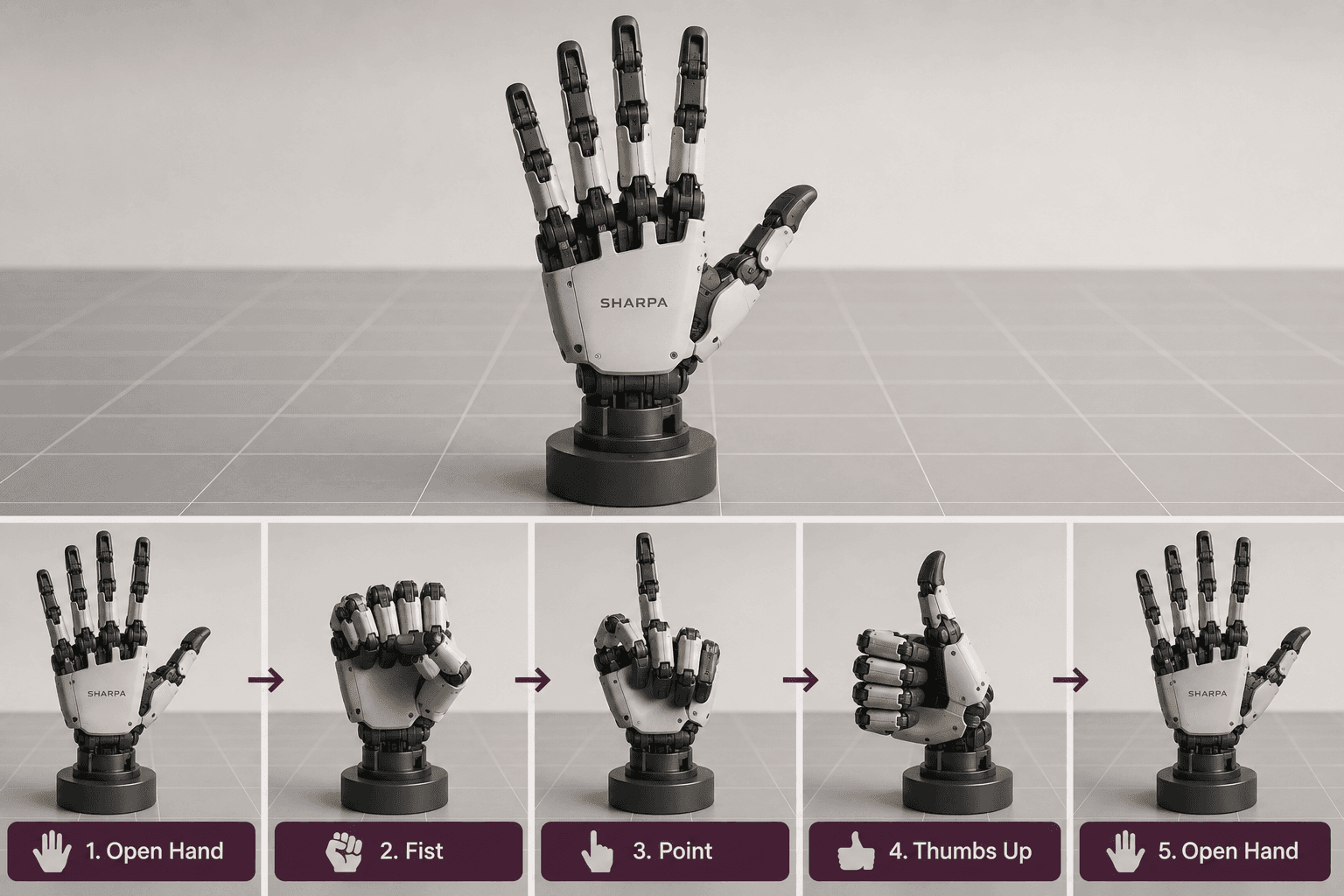
What can you do with a five-finger robot hand and a few lines of instruction? Start simple: teach it to make a handful of recognizable gestures.
This walkthrough takes the SharpaWave hand into MuJoCo and gives it a scripted sequence of finger movements, with Drift setting up the scene and the motion from one prompt. It's a gentle entry point into controlling a dexterous hand, and a nice contrast to why robot hands are so hard once you move past scripted poses into real manipulation.
What the SharpaWave hand is?
The SharpaWave, made by the robotics company Sharpa, is a dexterous five-fingered robot hand with 22 active degrees of freedom at human hand size, built to approach the range of motion of a real hand. It's the same hand that appears on Apptronik's Apollo humanoid in Google DeepMind's Gemini Robotics 2 demos, where it handles delicate tasks like sealing bags and handling light bulbs.
Here we're using it in a much simpler way, on its own, as a standalone hand rather than attached to an arm or a robot. That lets us focus entirely on the fingers and what it takes to move them into specific, coordinated shapes.
What we asked Drift to build?
We start from the existing SharpaWave model and give Drift one prompt: use the hand as a standalone end-effector, build a simple MuJoCo scene, and script a smooth finger sequence that runs through five poses, open hand, closed fist, a pointing index finger, a thumbs up, and back to open, keeping the hand fixed in place so the focus stays on the finger motion.
Two choices in that prompt matter. Keeping the hand fixed removes arm movement from the picture, so nothing distracts from the fingers. And asking for a smooth sequence means the hand eases between poses rather than snapping, which is what makes the gestures read as natural. New to the simulator? Here's how to install MuJoCo in one prompt first.
How Drift builds the scene and the sequence?
From that prompt, Drift sets up the MuJoCo scene with the hand fixed in position and generates the scripted motion that carries it through the five poses. It works out the joint targets for each gesture and the transitions between them, then packages it into a runnable file.
Getting a specific gesture right means setting many finger joints to the correct angles at once, a fist needs every finger curled, a point needs the index extended while the rest close, a thumbs up flips that around. Generating those poses and the smooth motion between them from a prompt skips the manual work of hand-tuning each joint angle by trial and error.
Watching the hand run through its gestures
We launch the generated file and MuJoCo opens with the hand in its starting open position. Then the sequence plays out: the hand smoothly closes into a fist, opens into a pointing gesture with the index finger, switches to a thumbs up, and finally returns to the open hand it started from.
Letting each pose hold for a moment makes the sequence easy to follow, and the smooth transitions between them are what sell the gestures as deliberate rather than mechanical. Each shape is just a particular combination of finger joint positions, but strung together they read as gestures anyone would recognize.
Why coordinated finger motion matters?
It's a simple sequence, but it makes a real point: recognizable gestures are just individual finger movements coordinated in the right way. A fist, a point, and a thumbs up come down to the same thing: different combinations of the same joints moving together.
That coordination is the foundation everything harder is built on. Scripting fixed poses is the easy end of the spectrum, and real manipulation, grasping unfamiliar objects, adjusting grip by feel, reacting to contact, is far tougher, which is the whole reason robot hands are so hard and a central challenge in embodied AI. But it starts here, with getting the fingers to move where you want them. Change the poses, add your own gestures, and see what the hand can express. The full walkthrough is in the video above.
FAQ
- What is the SharpaWave hand? The SharpaWave is a dexterous five-fingered robot hand with many independently controllable joints, designed to approach the range of motion of a human hand. It's used on humanoid robots, including Apptronik's Apollo in Google DeepMind's Gemini Robotics 2 demonstrations.
- How do you make a robot hand form a gesture? A gesture is a specific combination of finger joint positions. To form one, you set each joint to the right angle, for example curling all fingers for a fist, or extending the index while closing the others to point. Smooth transitions between these joint targets create natural-looking gestures.
- Is scripting gestures the same as robot manipulation? No. Scripting gestures moves the fingers through predefined poses, which is relatively straightforward. Real manipulation, like grasping unfamiliar objects and adjusting by touch, is much harder because the hand must react to contact and objects it wasn't pre-programmed for.
- Why keep the hand fixed in place for this demo? Fixing the hand removes arm and body motion from the scene, so the focus stays entirely on finger movement. It isolates the coordination of the fingers, which is the point of the demonstration.
- How does Drift set up the gesture sequence? From a single natural-language prompt, Drift builds the MuJoCo scene with the SharpaWave hand fixed in place and generates the scripted finger motion through all five poses, including the smooth transitions, so you can launch it and watch without hand-coding each joint angle.


