Product
Building a Custom Mobile Manipulator in MuJoCo
Build a custom mobile manipulator in MuJoCo by combining a Makerarm robotic arm with a four-wheel mecanum base using Drift.
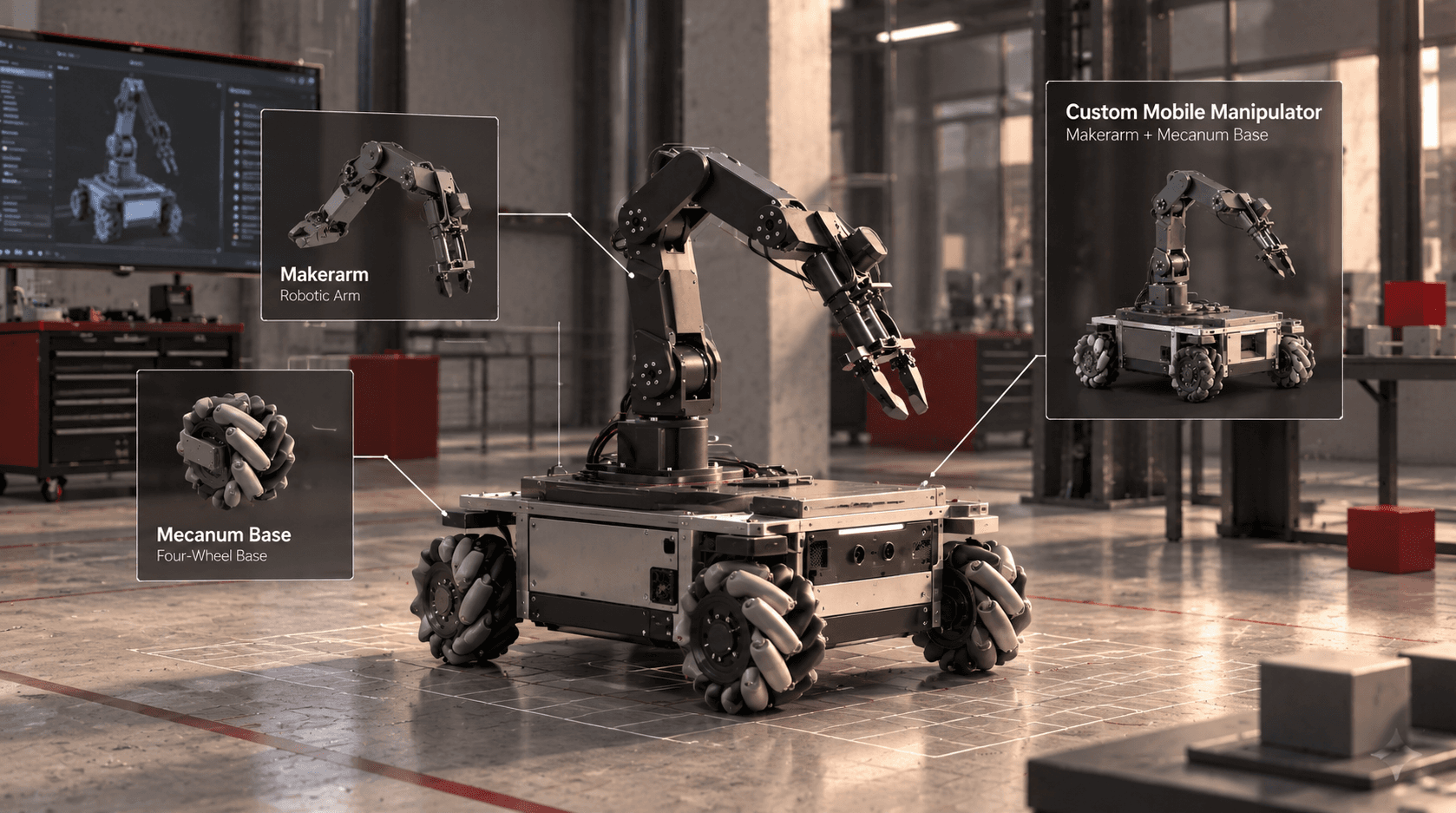
What happens when you combine an existing robotic arm with a completely new mobile base? We used Drift to bring a Makerarm arm and four mecanum wheels together in MuJoCo, creating a custom robot without starting from scratch.
Combining Two Existing Robot Components
A robotic arm can reach, grasp, and manipulate objects, but its workspace is limited by where the arm is mounted. A mobile base changes that equation by allowing the entire system to move between locations. Combine the two, and you get a mobile manipulator: a robot that can navigate its environment and interact with objects.
For this build, we wanted to explore that idea by combining the Makerarm robotic arm with a four-wheel mecanum base. Rather than designing a new robot model from the ground up, we started with an existing arm and built a new platform around it in MuJoCo.
The goal was to bring both components into one mechanically consistent simulation, with the arm mounted on the base as a single robot. That meant getting the geometry and placement right so the result looked and behaved like one integrated system, rather than two unrelated models sitting on top of each other.
Building the Robot in MuJoCo With Drift
We asked Drift to reuse the existing Makerarm model, create a four-wheel mecanum base, and mount the arm on top. The task was to assemble the new configuration while preserving the components we already had.
This approach changes how you can experiment with robot design. You don't necessarily need to create every link, joint, and component from scratch before testing a new idea. Starting with an existing model gives you a foundation to modify, extend, and combine with other hardware.
MuJoCo provides the physics simulation environment in which the assembled robot can be inspected and developed further. If you're new to the simulator, our guide to building a pick-and-place scene in MuJoCo shows how the same workflow can be used to create a robot and its working environment.
Why Use a Mecanum Base?
The four mecanum wheels are what make this configuration particularly interesting. Unlike conventional wheels, mecanum wheels use angled rollers that allow a properly configured four-wheel platform to move sideways as well as forward, backward, and rotationally. By combining the base's potential for omnidirectional movement with the Makerarm's manipulation capabilities, we get a platform designed for more flexible positioning.
Imagine a robot approaching a workstation, moving sideways to line up with a target, and then using its arm to pick up an object. A mobile manipulator could potentially handle all those stages without requiring a separate fixed arm at every workstation.
There is an important distinction, though: building the model is only the first step. The simulation needs appropriate wheel geometry, contact settings, actuators, and control logic before the base can reliably demonstrate the intended movement. The current build establishes the combined robot configuration; coordinated navigation and manipulation are the next stages to develop.
From Existing Models to New Robot Designs
The interesting part of this experiment is how quickly a familiar component can become part of a different robotic system. The Makerarm remains the manipulator, and the mecanum base supplies a new mobility option, but together they form a configuration with different possibilities from either component on its own.
From here, we can work toward controlling the wheel speeds, moving the robot to target positions, and coordinating the base with the arm during manipulation. We could also add objects and workstations to test whether the robot can complete a pick-and-place task while repositioning itself.
That is the advantage of treating simulation as a design space, not just a place to test finished robots. You can reuse existing models, explore different configurations, and develop new capabilities before committing to physical hardware. Sometimes, building a new robot starts with combining the right pieces.
FAQ
What is a mobile manipulator?
A mobile manipulator combines a mobile base with a robotic arm. The base moves the system around its environment, while the arm performs tasks such as grasping, moving, and placing objects.
What are mecanum wheels used for?
Mecanum wheels enable a suitably designed four-wheel robot to move in multiple directions, including sideways, without turning first. This can help a mobile robot position itself precisely in confined workspaces.
Can you build a custom robot in MuJoCo using existing models?
Yes. Existing robot models can serve as building blocks for new simulation configurations. The assembled model still needs appropriate geometry, joints, contacts, and control settings to behave correctly.
What could this mobile manipulator do next?
The next steps could include wheel-speed control, autonomous navigation, arm motion planning, and coordinated pick-and-place tasks. These capabilities would need to be implemented and tested beyond simply assembling the model.